
Adding a House Account Payment Type
When online payment is required in all orders, but the retailer wants to extend term payment to his house accounts and bill them on a periodic basis, rather
When online payment is required in all orders, but the retailer wants to extend term payment to his house accounts and bill them on a periodic basis, rather than collecting their payment at the time of online order, you can take "payment" by "charge store account" and invoice them later.
To set up:
- In Lab 50: Store Mgmt > Payment Settings.
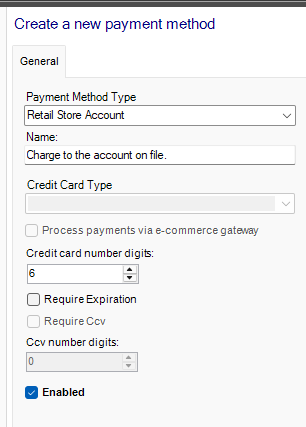
- Add a new payment, choose Retail Store Account.
- The number of digits can be set in the admin, so when the customer orders, he chooses to “pay with a store card” and enters his designated number. The order submits as long as the correct number of digits is entered, and shows in Lab 50 as “pay in store” (no number is included with the order).
To invoice:
Each month (or other interval), the retailer runs the “Online - Sales - Line Item Detail” from myLab (more info Reports) with the correct timeframe designated. The report would then be sorted by payment type to filter the orders where no payment type has been set (these are considered “unpaid online” (essentially “pay in store”), then sort by customer email address to group each house account’s orders for that billing period.