
PF Kiosk v2.0 Release Notes
What's new, updated, and fixed in PF Kiosk v2.0, including SmartResize uploads, all-new receipts, and private customer sessions.
For releases before v2.0, see the older PF Kiosk release notes.
October 23, 2026
SmartResize uploads, all-new receipts, and private customer sessions.
PF Kiosk v2.0
PF Kiosk Suite
-
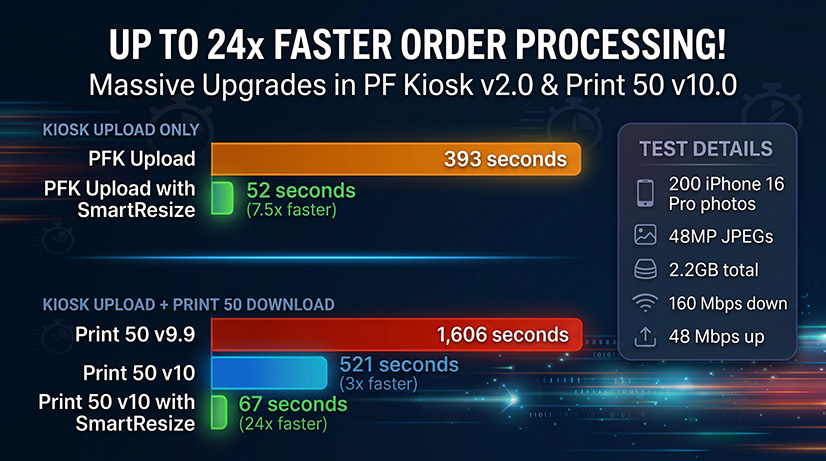
New SmartResize: kiosk photo uploads are now sized to what each print actually needs, rather than uploading every photo at full size. pfRouter works out the pixels required from the print size ordered and DPI settings, and accounts for the customer's crop so the printed area still lands at the target DPI. When a photo is used on several prints, the most demanding print size wins. Photos used on any non-print product (such as photo books, cards, and other folio products) are not affected and keep the full-resolution upload. SmartResize results in much smaller, faster uploads from today's high-megapixel phone photos, with no loss in print quality, preventing bandwidth congestion and allowing you much faster turnaround on orders. Dealers can fine-tune SmartResize in myLab › Store Management › PF Kiosk › Settings, with "Apply to All Prints", a Default DPI, and specific overrides for individual product or product tags.

-
New All-new receipt. A complete overhaul of the receipt printing engine and macro system, plus a new default receipt.

-
One template language to rule them all. The same macro system is now used across the platform, from transactional emails, to Print 50 invoices, and PF Kiosk receipts. There's a single system to learn when customizing, and all now show pricing, discounts and product options the same way. Advanced features, such as Region Macros, are also supported, allowing you to easily hide/show content on the receipt based on order details.
-
Products are grouped into one line per product and option, with discounts, sale prices and option charges listed beneath each line, just like your customers' order confirmation emails.
-
Modern printing engine. PFK now uses its built-in Chromium browser rendering engine to give receipts full access to modern HTML5 layouts, fonts and shading.
-
Easy configuration via myLab in Store Management > PF Kiosk > Settings. Feature flags allow you to enable or disable specific areas of the receipt (barcode, customer info, thank-you message, etc.) with just a checkbox. You can also specify a printer name, if you want to use something other than the Windows default printer, along with the receipt paper spool width.

-
Advanced customization via myLab Message Template. You can exert complete control over the receipt by editing our template to your needs or creating your own HTML from scratch. myLab's Email Messages page now allows you to create a template for event type "PF Kiosk: Receipt", and can preview what the receipt will look like as well.
-
-
New pfRouter can now harvest orders from partner vendors via hot folder and submit them into Photo Finale for fulfillment by the dealer. Each partner order (an APM order XML plus its images) is created in Photo Finale, its photos uploaded, and then released as a new order, with automatic retries and resumable progress if anything is interrupted. [21424]
-
New Added automatic renewal of the Local Photo Service (LPS) HTTPS certificate. Kiosks now pick up a renewed certificate on their own, without requiring a new kiosk release, and without interrupting a customer session in progress. Downloaded certificates go through a security vetting process to ensure they are only issued for the correct domain, chain to a trusted root, and are within the validity period.
-
New Enhanced privacy for customer sessions. Each customer session now runs in its own temporary, in-memory browser profile that is thrown away when the session ends, so every customer starts with zero cookies, sign-ins, stored site data, or cached pages from the previous customer. This replaces the old reset-page cleanup between customers.
-
New Configurable brightness and contrast override adjustments for scanned photos, from -100 to 100, using the new
scannerBrightnessAdjustmentandscannerContrastAdjustmentsettings via Store Management > PF Kiosk > Advanced Configuration in myLab. -
Updated LPS, pfRouter, and TwainBridge now process photos using the same advanced engines as the Photo Finale servers. This replaces older Windows-based image handling with the robust system behind your customers' online orders, ensuring fast resizing and cropping, broad format support, and modern native codecs for consistent, premium results from upload to print.
-
Updated All PF Kiosk programs and DLLs, including PrintServer and third-party libraries, are now digitally signed with Photo Finale's code-signing certificate to help ensure Microsoft's Smart App Control and Defender SmartScreen security layers accept the app as authentic in a zero-trust environment.
-
Updated The kiosk's built-in browser engine has been upgraded from Chromium 135 to Chromium 151, bringing the latest security fixes and web platform support. This includes fixes for:
- Requests from the kiosk pages to the Local Photo Service hanging indefinitely under Chromium's new Local Network Access permission checks.
- The kiosk failing to start when another Chromium-based (CEF) app on the station shares the default browser cache folder, or when the kiosk is started as an administrator. The kiosk now uses its own cache folder.
-
Updated Cleaner installs and updates. Outdated files from earlier versions are removed before the new version is installed, including the previous kiosk web UI files, old LPS and TwainBridge DLLs, unneeded Chromium locale packs, and over 50 DLLs that are no longer used.
-
Updated Improved reliability and upkeep of the LPS photo database:
- Updated to the latest SQLite database libraries, which include a fix for a rare database corruption bug.
- A new SQL table index, added automatically on first run, speeds up the cleanup of expired customer sessions.
- A weekly maintenance pass checks and optimizes the database. It only runs before 8 AM local time, so it never slows down a customer session.
- Fixed several startup, shutdown, and cleanup issues, including retrying purges that failed.
-
Updated When an order fails to upload, pfRouter now automatically emails the kiosk's logs to Photo Finale support (same as the manual "Send Logs to Support" function on the Admin screen), so problems can be investigated sooner.
-
Updated Security improvements for mobile uploads to the kiosk:
- New claim codes are six characters (previously five), generated with secure randomness.
- Claim codes are tied to the dealer that issued them, and consistently expire after six hours.
-
Fixed The kiosk reset sequence and homepage banner loading are now much smoother transitions without the annoying partial-page-loading flashes and redraws.
-
Fixed The film icon on the PF Kiosk Import page is now the same size as the other source icons when a kiosk is configured for all five import methods (Media Card, Mobile Device, Scanner, Online Account, & Film Services) to be enabled.
-
Fixed Stripe Link is now automatically disabled during PF Kiosk ordering (card entry only) to ensure customers' data remains private between sessions. [21284]
-
Fixed PF Kiosk photo crops are no longer scaled a second time when a kiosk retries a photo upload, which could result in incorrect crop rectangles.
-
Fixed Folio products ordered through Express fulfillment now use the product's configured export format (JPEG, PDF, PNG, or PDFX), rather than only JPEG or PDF.
-
Fixed Activation and licensing errors are now reported with their actual error codes, rather than always being reported as Code 15 (Server Error). [21419]
-
Fixed A photo could fail to download, or later be reported as missing, when the LPS database was busy at the moment the photo's location was being updated. LPS now tolerates brief database locking, and falls back to the photo's original location if needed.
-
Fixed Certain JPEG photos could fail to crop or resize because of an intermittent decoder problem. LPS and pfRouter now retry the photo automatically, keeping the requested crop and output settings.
-
Fixed pfRouter could fail with an error when an order didn't contain any line items.
-
Fixed Added protection against an LPS photo being changed by two operations at the same time while it is being downloaded or uploaded for routing.
-
Fixed An order that was just finishing up could be picked up from the incoming folder and started again.
-
Fixed The order progress display in the pfRouter main window no longer flickers.
-
Fixed HEIC/HEIF photos could fail to process when several were handled at once right after LPS started.
-
Fixed An event handler used for PF Kiosk operations (such as inactivity timeout tracking) could be lost if the page reloaded via the customer signing into an account or using the Refresh button in the kiosk toolbar.
-
Fixed Files in the pfRouter incoming routing folder whose names aren't valid order numbers are now moved to an "Incoming\NonConforming" subfolder, instead of being retried over and over.
PrintServer
- Updated PrintServer now automatically retries when sending order status updates to the Photo Finale API fails for a transient reason.
- Fixed Express fulfillment receipts using Legacy Mode now show the correct tax and grand total when account credit was applied to the order.
- Updated Additional print driver updates, listed in the Print 50 v10.0 release notes, including:
- The Hot Folder printer no longer requires arduous configuration for custom products and can instead render & print products that haven't been explicitly set up in SetupWizard, using print dimension data provided by the API. [21364]
- Higher quality output from the Hot Folder and Noritsu DPOF printer drivers, which now produce full-color-resolution (4:4:4) JPEGs at maximum quality with bicubic scaling. The Hot Folder's Rendering DPI setting now also applies when a product has no DPI of its own.
- Additional updates & fixes to Darkroom Pro, Fuji FCIM, and Turbine drivers.