
Print 50 v10.0 Release Notes
What's new, updated, and fixed in Print 50 v10.0, including the new licensing system, faster downloads, all-new invoices, and the 64-bit FolioServer.
These notes cover every change in Print 50 v10.0, grouped by component: installation and licensing, the Print 50 app, FolioServer, PrintServer and print drivers, and Lab 50. For releases before v10, see the older Print 50 release notes.
Installation & Licensing
Your License ID is your previous Lab 50 APM ID. Print 50 v10 License IDs are listed on the myLab Dashboard in the "Print 50 v10.x Licenses" section. If your license is not listed on the dashboard, please contact support for assistance.
- Updated Simplified licensing: Print 50 is now licensed directly through the updated Photo Finale Platform activation system, originally introduced with PF Kiosk, using your License ID and Dealer Code.
- Existing stations will automatically migrate from the old system to the new without intervention, in most circumstances.
- Licensing problems now show clear messages explaining what went wrong and what to do next.
- Updated A cleaner, safer installer:
- Before upgrading, your station's custom configuration files are backed up to a dated folder under Backup in the Print 50 installation folder.
- All platform apps are closed automatically before installing, so no files are left in use.
- Outdated program files from earlier versions are removed before the new version is installed.
- The installer no longer opens any inbound Windows Firewall ports, and removes the ones added by earlier versions.
- Updated First Print 50 release with all DLLs (including FolioServer & PrintServer) digitally signed (as well as the executables) to help ensure Microsoft's Smart App Control and Defender SmartScreen security layers accept the app as authentic in a zero-trust environment.
Print 50
-
New Massive improvements in order downloading and image processing. Print 50's download pipeline has been rewritten to optimize & parallelize the workload and cut wait times to a fraction of previous releases. Additionally, Print 50 now prepares photos with the same professional imaging pipeline as the Photo Finale servers, replacing the older Windows-based image handling with the engines behind your customers' online orders for fast, high-quality resizing and cropping, broad format support, and modern native codecs, providing consistent, high-quality results from upload to print. Photos are automatically prepared and normalized as they download, with nothing to configure. Multiple backup engines ensure that if one graphics library can't read a photo, Print 50 automatically retries with two others, so a problem photo is less likely to hold up an order.

-
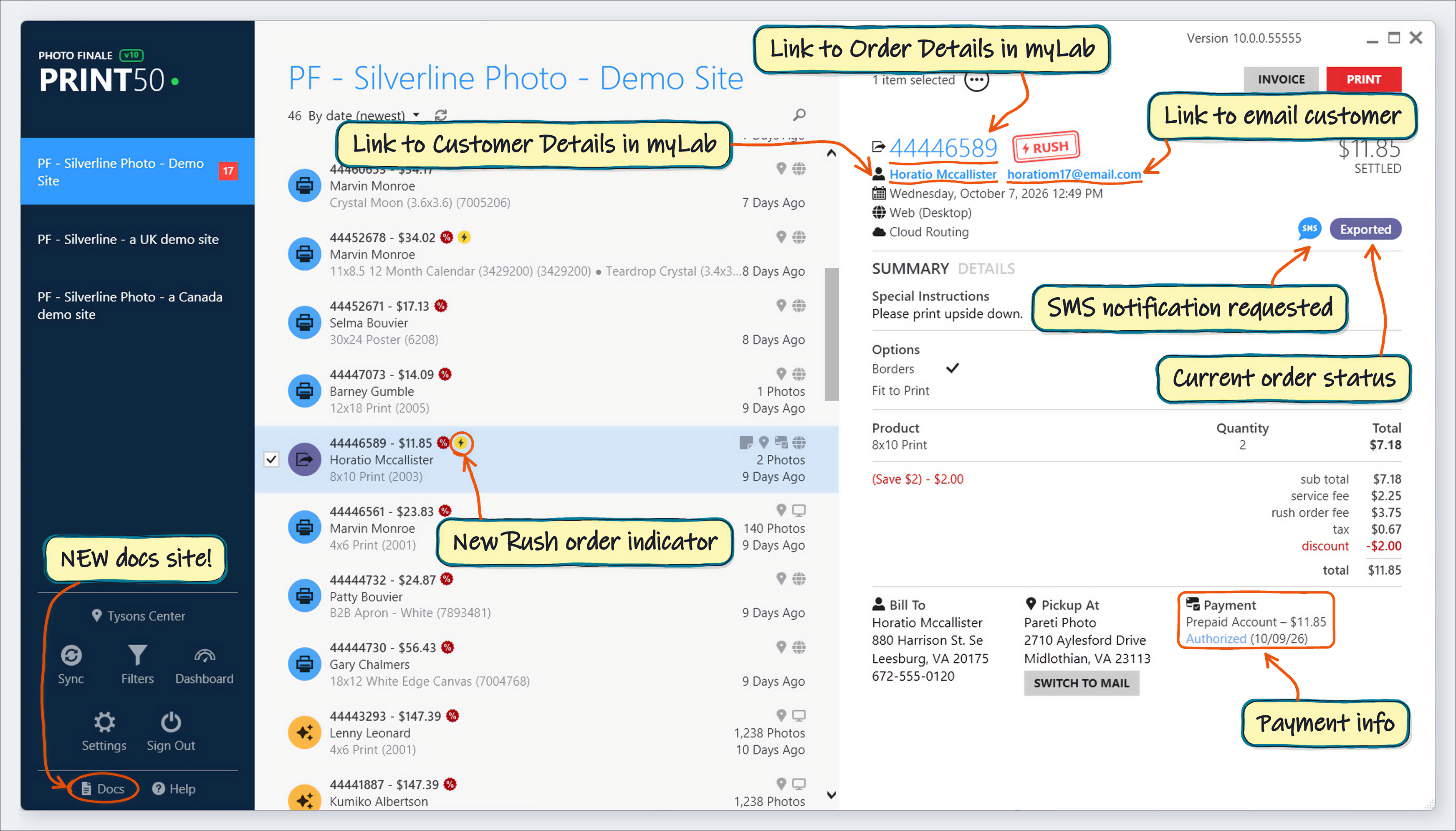
New A fresh look and a long list of quality-of-life improvements throughout Print 50:
-
The main window remembers its size, position, and maximized state between launches, adjusted to fit your current monitor setup.
-
The order details header now includes a color-coded order status label, matching the status icon in the order list.
-
Rush orders stand out at a glance: a yellow lightning-bolt badge in the order list, and a red "RUSH" rubber stamp beside the order number in the order details.
-
Personalizations (aka product options/attributes) are now summarized by grouping repeats (e.g. "Glossy (x8)"), allowing all of the distinct options from the order to be shown. The Details tab shows the personalization assigned to each line item.

-
Mobile notification indicator for orders where the customer asked to be notified by text message (SMS). [21338]
-
Added a Sort menu option for "By date (oldest)" to view orders in chronological order. [20612]
-
A new Docs link (https://docs.photofinale.com) sits beside Help in the left panel footer. Our updated docs site features enhanced search and a built-in AI chatbot for answering questions.
-
When more than one invoice is configured, the order's right-click "Print Invoice" option becomes a submenu: print any single invoice, choose several with "Select Multiple...", or "Print All".

-
The order list and details header now show the customer's Bill To name, and sorting by first or last name uses the billing name too.
-
Right-click on the order number to copy the order ID to the clipboard.
-
Bill To and Ship To / Pickup At addresses no longer include the country line.
-
The Special Instructions indicator now uses a sticky-note icon, so it isn't mistaken for the new SMS icon.
-
All dealer names in the dealer list now use the same font size, wrapping to two lines when needed instead of shrinking to fit.
-
-
New All-new invoices. A complete overhaul of the invoice printing engine and macro system, plus a new default invoice template for the first time since Print 50 launched.

-
One template language for invoices & emails. The new invoices use the same macro system as your order confirmation and status emails, so there's a single system to learn when customizing, and both show pricing, discounts and product options the same way. Advanced features, such as Region Macros, are also supported, allowing you to easily hide/show content on the invoice based on order details.
-
Products are grouped into one line per product and option, with discounts, sale prices and option charges listed beneath each line, just like your customers' order confirmation emails. A 1,000-print order that used to fill a dozen pages now fits on a single page.
-
Modern printing engine. Invoices were previously rendered by Microsoft Internet Explorer's built-in engine, which Microsoft has long since retired and which could only display web pages the way browsers did in the 2000s (IE7 quirks mode). Print 50 now uses Microsoft Edge WebView2, the same engine as today's Microsoft Edge and Google Chrome. Invoices can use modern HTML5 page layouts, fonts and shading, and print exactly as designed.
-
Clean, easy-to-scan layout: a status row at the top shows how the order is fulfilled (Ship / Store Pickup), where it came from (Web, Kiosk, App, PRO or Partner) and whether it's prepaid or has a payment due, so staff can see what to do with an order at a glance.
-
Choose what appears on your invoice. Settings › Invoicing now has simple on / off options for a number of invoice features: the order barcode, UPC codes, paper surface, print count summary, external order number, and Retail Store Account details, with no HTML editing needed.

-
Printing to virtual printers, such as the Microsoft Print to PDF driver, now automatically suggests a file name based on the order number (e.g. "44521762 Invoice.pdf").
-
Stations using the standard invoice move to the new design automatically. A new option in Settings > Order Management > Invoicing, "Print the classic invoice", brings back the original layout at any time.
-
Adding a new custom invoice now starts from a copy of the new or classic built-in design, so you can tailor it from a working starting point.
-
-
New Order notification sounds. Print 50 can now play a sound as each new order is received (or finishes downloading, if auto-download is enabled), with a separate sound for rush orders, so you'll know when work arrives even when you're away from the screen. Configuration can be found in Settings > Order Management > Notifications. You can add your own sounds too: just drop .wav files into the Sounds folder inside the Print 50 installation folder, and they'll be listed the next time Print 50 is launched. [21219]

-
New A new Settings > Caching screen shows when Print 50's product data was last refreshed, and a "Refresh Cache" button pulls the latest product and dealer information right away, without restarting Print 50.

-
Updated The Export settings screen now includes a list of the available macros for file and folder names, and the mockup filename and subfolder examples update in real time as you type. [21192]

-
Updated The order details payment summary has been updated, including support for Store Account payments. Store Account card numbers are also included on printed invoices.
-
Updated New !ORDER_EXTERNAL_ID! and !ORDER_NUMBER_WITH_EXTERNAL_ID! invoice macros, for orders that carry an order number harvested from a partner system. Such orders show both numbers in the order list, e.g. "123456 (A-98765)", and can be found by searching for their Photo Finale order number.
-
Updated Customer-entered text printed on invoices (special instructions, gift messages, and personalization text) is now safely encoded (against hacking attacks) and keeps its line breaks.
-
Updated Invoicing settings are clearer: "Advanced" is now "Custom / Advanced", "Add Printer" is now "Add Invoice", and invoices without a specific printer designated display as "(Default Printer)" in the invoice lists.
-
Updated The Dashboard's order tiles now show breakdowns for Web, Kiosk, and App orders, matching the Source categories in the filter panel.

-
Fixed Signing out and signing into another dealer will no longer display the order data from the first dealer.
-
Fixed An order whose download was interrupted partway through could be marked as downloaded with photos missing. Print 50 now retries the photo, and if it still can't be downloaded, logs which photo failed.
-
Fixed Download progress could climb past 100% when a photo had to be downloaded again.
-
Fixed The myLab order link in the order details pane could open the wrong order. It now always opens the correct order.
-
Fixed PNG photos with transparent areas could be printed with black backgrounds. [20725]
-
Fixed Photos could be cropped incorrectly when the actual photo's dimensions didn't match the dimensions on record for it. [19699, 19870, 21326, 21393, 20236]
-
Fixed Opening an order could occasionally fail due to a temporary hiccup in the secure connection to the Photo Finale servers; Print 50 now retries automatically.
-
Fixed Pressing Enter in an empty search box would display the word "fugwazy". [21194]
-
Fixed The expanded search box no longer covers the sort and refresh buttons.
FolioServer
- New Meet the all-new FolioServer, Print 50's creative product rendering engine, rebuilt from the ground up as a modern 64-bit application. Photo books, cards, calendars, and every other creative product now renders on a faster and more capable foundation.
- Up to 20x larger maximum render sizes. The new engine is no longer boxed in by the memory limits of the old 32-bit architecture, so large-format content and high-resolution pages render without compromise.
- Transparent PNG output. Pages can now be rendered with a transparent background, so transparent areas of layouts and customer content are preserved instead of being filled in. Ideal for products and outlab partners that need a clear background.
- Transparent PDF output. A new PDF format that preserves the same transparency inside a PDF, for suppliers and workflows that require it.
- A brand-new PDF v1.7-compliant engine replaces the aging v1.4 PDF component, for faster, more reliable PDF creation of multi-page products such as photo books & calendars.
- Faster content downloads: FolioServer now streams several content assets at once and reuses network connections, instead of being limited to two downloads at a time.
- Smarter job scheduling keeps renders flowing under heavy load. Large multi-page books and single-photo outputs no longer hold up other renders waiting in line.
- Improved stability with over a dozen rendering and threading bugs closed.
PrintServer & Print Drivers
- New The Hot Folder printer no longer requires arduous configuration for custom products and can instead render & print products that haven't been explicitly set up in SetupWizard, using print dimension data provided by the API. [21364]
- Updated Darkroom Pro printer driver updates:
- A new "Create Order Subfolders for Images" option puts each order's images in its own subfolder within the image file location. Empty subfolders are cleaned up automatically.
- The customer's email address is now sent to Darkroom with each order.
- The Add Canvas dialog now explains the "Size" and "Media" entries, and Media now starts out blank instead of defaulting to "luster".
- Order folder names now match Darkroom's specification better.
- Fixed purging of old photos.
- Updated Fuji FCIM printer driver updates:
- Photos are now rendered (cropped and sized) to the product's print size before being sent to FCIM.
- The Surface and Printer settings for each product are now optional. When left blank, the driver's default surface and printer are used.
- Fixed issue where the first photo in each group of prints (sharing the same surface and printer) could be left out of the job sent to the printer.
- Fixed purging of old photos from the image folder.
- Updated Turbine printer driver enhancements: new "Order Prefix" and "Transaction Type ID" settings, order totals (subtotal, tax, discount, and total) are now sent with each order, and the Service ID setting is now applied to orders (default changed to 30, "Same Day").
- Updated The Noritsu DPOF printer driver now converts images to JPEG for compatibility. [21282]
- Updated PrintServer now automatically retries when sending order status updates to the Photo Finale API fails for a transient reason.
- Updated PF Kiosk receipts now print Special Instructions in the font size set in the receipt layout (minimum 9pt), instead of always using 9pt.
- Updated PrintServer now starts minimized to the system tray.
- Fixed Turbine printer driver: fixed a crash, large memory leaks, a photo rendering problem, and incorrect pickup and customer addresses.
- Fixed The Remote Logger now shuts down when PrintServer isn't running. [21140]
- Fixed The Setup Wizard's Customize Logo screen failed to load because it relied on Adobe Flash.
Lab 50
- Updated Lab 50's Email management section adds the Pro Upload Reminder and Account Inactive email events, though we recommend that email messages be edited in myLab. [21102]
- Updated Lab 50's customer details screen now shows prepaid plan credits for product tags (introduced in PF Web v19.1) by tag name. Product Tag prepaid plans should be edited in myLab, not Lab 50.
- Updated Lab 50's Rush Order Email configuration field now accepts up to 256 characters (previously 64).
- Updated Lab 50's "Sign in automatically" option has been removed.
- Fixed Fixed switching between dealers on the login screen in Lab 50. [21102]