
EQ-9800 and EQ-9850 Printers
Learn about Lucidiom's EQ-9800 and EQ-9850 laser printers, covering setup, tray configuration, calibration, consumables, and Photo Folio product printing.
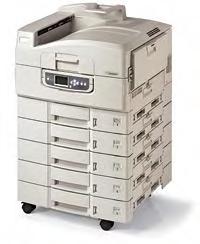 |
| EQ-9800/9850 |
Printer Overview
The EQ-9800 and EQ-9850 are laser printers sold by Lucidiom. They can produce exceptional 1200x1200 DPI duplexed pages up to 12x18 inches in the standard paper trays or up to 12.9x47.24 inches in the multipurpose tray. Retailers can calibrate the printer just like they do with regular photo printers via the EFI Fiery© RIP software, to deliver consistent, quality color every time.
The EQ-9800/9850 is the ideal solution for producing a wide range of documents on a variety of paper weights and sizes. Single Pass Color™ technology and the straight-through paper path allow for faster print speeds, minimal paper jams, and smooth handling.
Productivity features like Auto Media Detect automatically adjust the printer to your required media type, and Auto Color Balance ensures that output remains consistent from start to finish. Also included is Job Accounting software that allows tracking of printed pages, the types and quantities of paper used, and a record of printing activity.
Both printers are used in conjunction with the APM software to print the Photo Folio products offered as part of the EQ Pro package. The core products in Photo Folio are:
- Banners
- Envelopes
- Folded Cards
- Multi-Page Calendars
- Notepads
- Photo Books
- Posters & Collages
- Scrapbook Pages
The following are generally included with purchase (please check your purchase order to confirm):
- 5 paper trays, including a Multipurpose manual feed tray.
- Duplex unit (for auto, double-sided printing of pages up to 240gsm weight).
- On-site installation.
- 1 year on-site warranty.
Also included is a 5-year limited warranty for the LED heads, and a 90-day warranty for each consumable part that is replaced. Toner spillage, abuse to printer and parts, and broken equipment/drums due to improper installation are not covered under warranty.
Please contact your Lucidiom sales representative for further information regarding the purchase of this product.