
Faceted Product Search Links
Link customers into the Photo Finale browse experience pre-filtered by category, tag, product, or occasion using /browse/ URLs.
The browse experience at /browse/ gives customers a searchable, filterable view of your catalog. Faceted search links let you open that view already narrowed down — to a category, a tag, a single product's designs, or an occasion — so a marketing link lands customers on exactly the slice of your catalog you're promoting.
Results are always limited to your own store's catalog, no matter which filter the link starts from.
Replace demo.photofinale.com with your own PF site domain in any of these links.
Choose a starting filter
Each link format below starts the browse page with a different base filter. Pick the one that matches what you're promoting.
Shows products in a category and everything beneath it — children, grandchildren, and so on. Use this for broad promotions like "all cards".
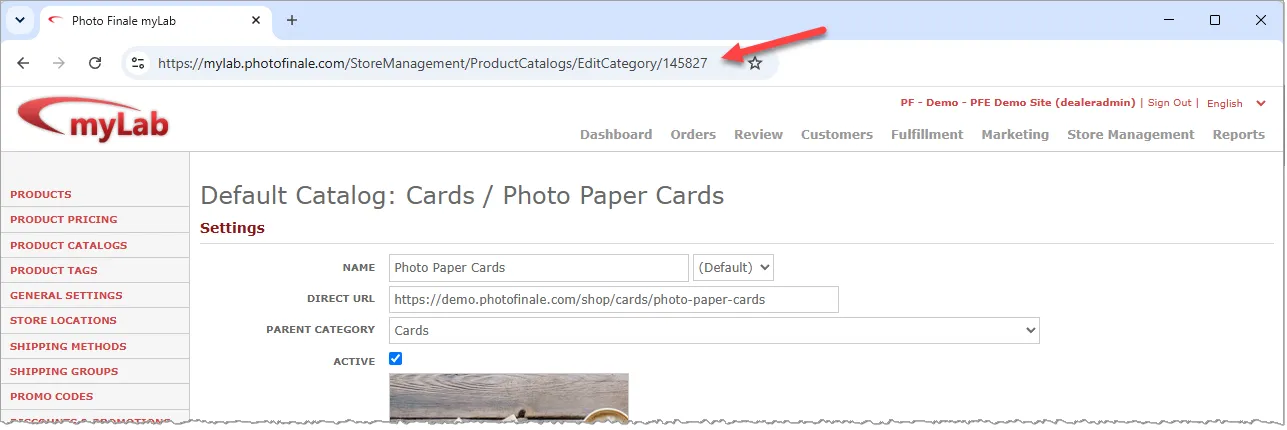
https://demo.photofinale.com/browse/categories/{idCategory}/Navigate to the desired category in myLab under Store Management > Product Catalogs.
The idCategory value is the number at the end of the URL.
Pre-select an occasion on any filter
The category, tag, and product filters above also accept an optional occasion parameter, which starts the browse page with that occasion facet already selected. The available occasion names are listed in the occasion ID reference. For example, stationery products filtered to Baby designs:
https://demo.photofinale.com/browse/tag/stationery?occasion=BabyTo pre-select more than one occasion, separate the names with a vertical bar:
https://demo.photofinale.com/browse/tag/stationery?occasion=Baby|BirthdayOccasion names in the occasion parameter are case-sensitive. occasion=Baby works; occasion=baby does not.