
Fuji JobMaker
The Fuji JobMaker interface allows the APM or Lab 50 software to convert orders generated from an APM into a format that a Fuji machine running the JobMaker
The Fuji JobMaker interface allows the APM or Lab 50 software to convert orders generated from an APM into a format that a Fuji machine running the JobMaker software can accept and print.
Prerequisites
- The APM and/or Lab 50 machine needs to be able to see the Fuji machine across the local area network, and vice versa.
**Note: If a firewall is enabled on one or more of the machines, it may need to be configured to let each machine modify and write files to the other.
- The Fuji Machine must have the ability to pull files from the APM and/or Lab 50 machine(s).
- The APM and/or Lab 50 machine should be able to access the shared Orders and Images folders on the Fuji machine. This may require creating a new user account to match the account on the Fuji machine. **Note: The computer name of the Fuji machine may vary.
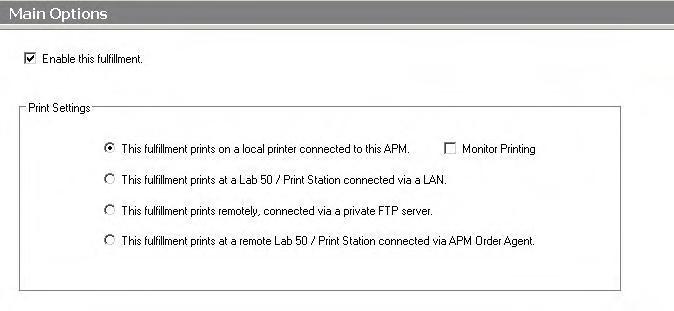
- If Lab 50 is not present in the local installation, then at least one or more fulfillments must be enabled to print to a local printer connected to the APM. This is seen in the screenshot below, taken from the main options of an enabled fulfillment in the Setup Wizard.
 |
| Print Settings |
Setting up the Fuji JobMaker Using the Setup Wizard
The Setup Wizard is used to configure the Fuji JobMaker Interface.
This process includes the following steps:
- Adding the printer interface and editing the general settings.
- Product setup from within the interface.
- Assigning printable products to the interface.