Proofing Gallery Training Documents & FAQ
Answers to frequently asked questions from dealers and photographers about setting up and managing Proofing Gallery sites.
Proofing Gallery Help Documents for Dealers and Photographers
For dealers-Signing a New Proofing Gallery.pdf For photographers-Getting Started with Prestige Proofs.pdf
FAQs from Dealers
- You pay it. You are our client, they are yours. You pay us and charge them whatever you wish.
- The account is a subaccount (child account) of your current (parent) account.
You can have it pay through their own Stripe account or yours. We recommend you collect the funds and distribute because most photogs don’t run big business and this takes the risk out of your hands.
Yes.
- We added a few new reports to your myLab, so you can run sales numbers needed for invoicing the Proofing site client.
- You will also be given the login credentials to the Proofing account, so you can log in directly if you wish.
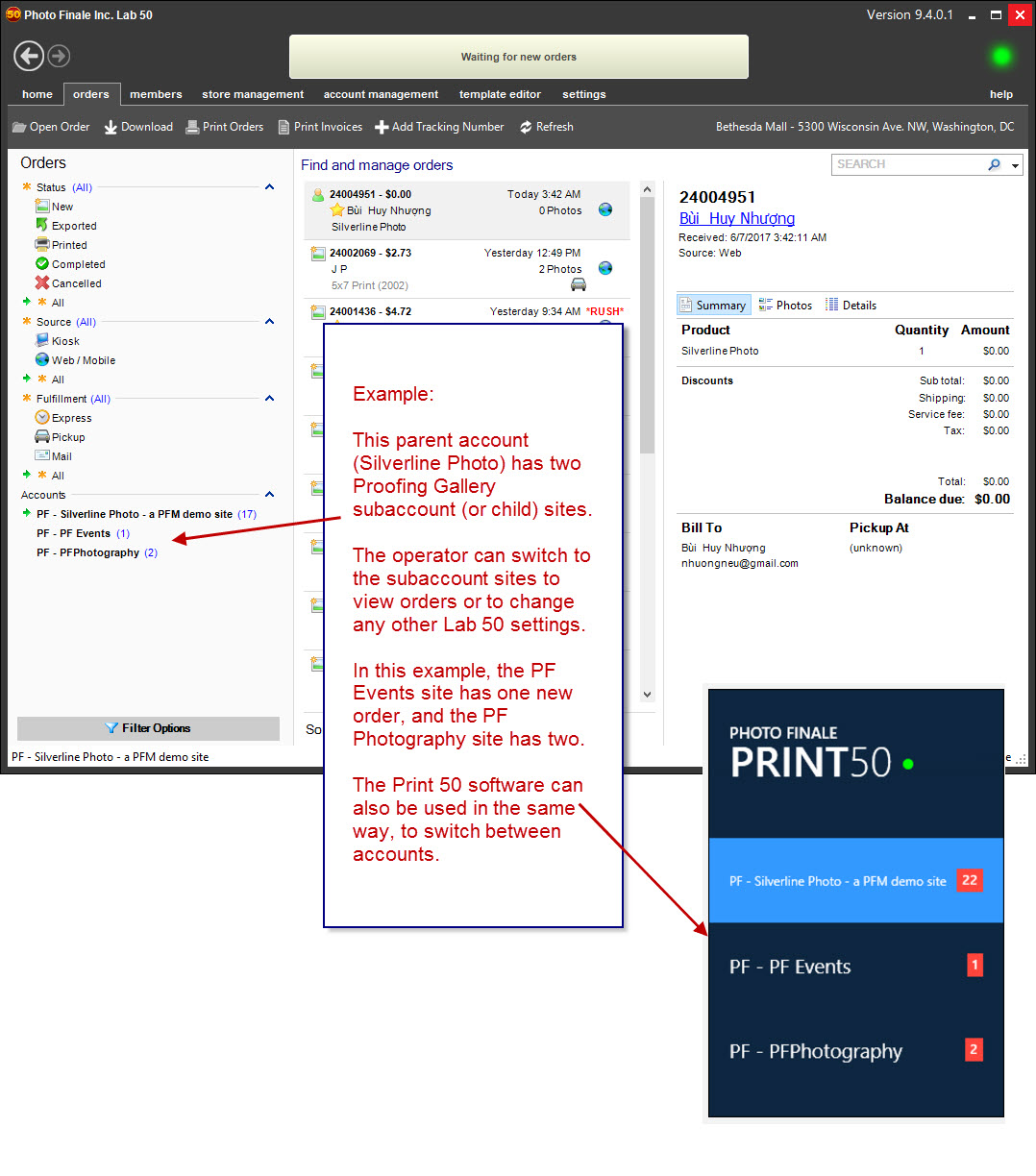
Yes, there will be a switcher in the lower left of your Lab 50 (or Print 50), so you can switch between accounts. It looks like this:
- Accounts involve various levels of custom setup so we do not offer demo accounts. The Proofing Gallery is very simple and the set up the same as you are used to from your main site. The only thing different is the section in myLab where the photographer would upload. It’s straightforward… you can see a demo of it in the YouTube video: https://youtu.be/56NdDs9KpBY (8 min). Other than that, it’s just like a regular PF account.
- You will also be able to log in as them (we give you the credentials) so can make changes for them if they need help… or, if you want to offer that type of management you could do everything for them.
Our commission comes off of the sale price, just like it does on your regular site. Keep in mind that the price they pay you for that print, while “wholesale price” is what most people call it, it’s not necessarily equal to what you might charge otherwise for the print to a photog on account, as it includes the website service for them as well. They aren’t paying any kind of other fees (support, Lab 50, startup, monthly site fees), just that “wholesale” to you, so what the photog pays you should cover those fees/costs.
- Yes, payment can go to their Stripe/PayPal (we recommend Stripe, it's a more integrated user experience) or yours, you can invoice them or pay out based on wholesale agreement. Dealers do it both ways.
- We have added a few reports to parent accounts so that you would no longer need to log in as the photographer to run numbers needed for billing.
We duplicate your catalog, then you adjust that for what you want to offer, as well as your recommended MSRP. This is then what we copy into the Proofing Gallery site to give a starting point… but then the photographer would adjust via myLab just like you would for your main site. OR, you could choose not to give them the myLab credentials and you could manage it all as a service to them. We have dealers doing it both ways… seems to be determined by how capable the parent dealer thinks the photographer is to handle those kinds of tasks…
- I have a form we will send you. Basically: name, site type, site URL, contact details, and if you want 90-storage or permanent, and a logo (or for standard sites, you can put that in for them in Lab 50). For upgraded sites, you should also supply About, Contact and Services.
- When we add the account as a child of yours, you can use Lab 50 and in the lower left switch to their site, then make any changes in the Lab 50 as you could for a normal site.
- The full resolution jpg up to a 40 megapixels per image limit.
- See here for color space info: Color Space (sRGB / Adobe RGB)
- You have two choices for storage: a 90-day or permanent. Both are unlimited in terms of size. The 90-day option will remove the Event and all collections and photos it contains 90 days after it is created. This means if you create the event but wait 60 days to upload photos...those photos would be removed 30 days later.
- We have structured the pricing (90 day / permanent) with photographers in mind… but if you have any artists whose art or photo art you print out as opposed to event type work, where it would be a low quantity that does not change much, but permanent storage needed… let us know, we can work with you on an alternate storage plan.
A few days after we receive the form. Custom domains generally add a few more days.
Yes, like https://pfevents.photofinale.com (or the prestigeproofs.com domain)
Before the Proofing Gallery was introduced, event photographers would make a user account on his/her own subaccount site, upload to that and turn on watermarks, then share out albums or share out a link to their collections page just like a consumer user would. Memberships could be offered, The user would scroll through the list of collections and find the one containing his or her photos. It could still work this way, but does not quite have the right user experience. The Proofing Gallery is the best option for a photographer, artist, or studio. A traditional subaccount is ideal for a charity, church, or school where a consumer would join and become a member, upload his or her own photos, store them, create projects, pull in Facebook and Instagram images.
FAQs from Photographers
- No, there is no download button. Right-click is disabled so they cannot save the screen res file either.
- Future plans include the ability for you to offer downloads for sale. A current (v12) workaround: create a print product called Download, and price it. They can order this product for each photo they want to download. You would have to handle the packaging for the files manually.
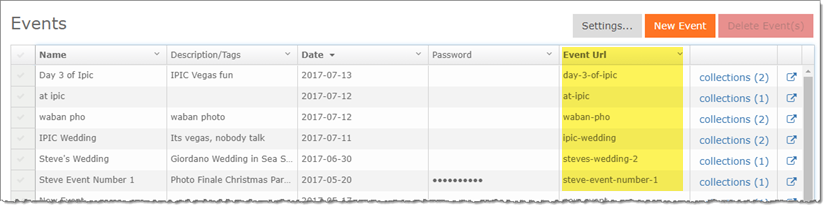
- Yes: the URL scheme is: domain + /events/ + event-url
- For example: https://pfphotography.prestigeproofs.com/events/ipic-wedding